devd
Your dev servers, finally in one place.
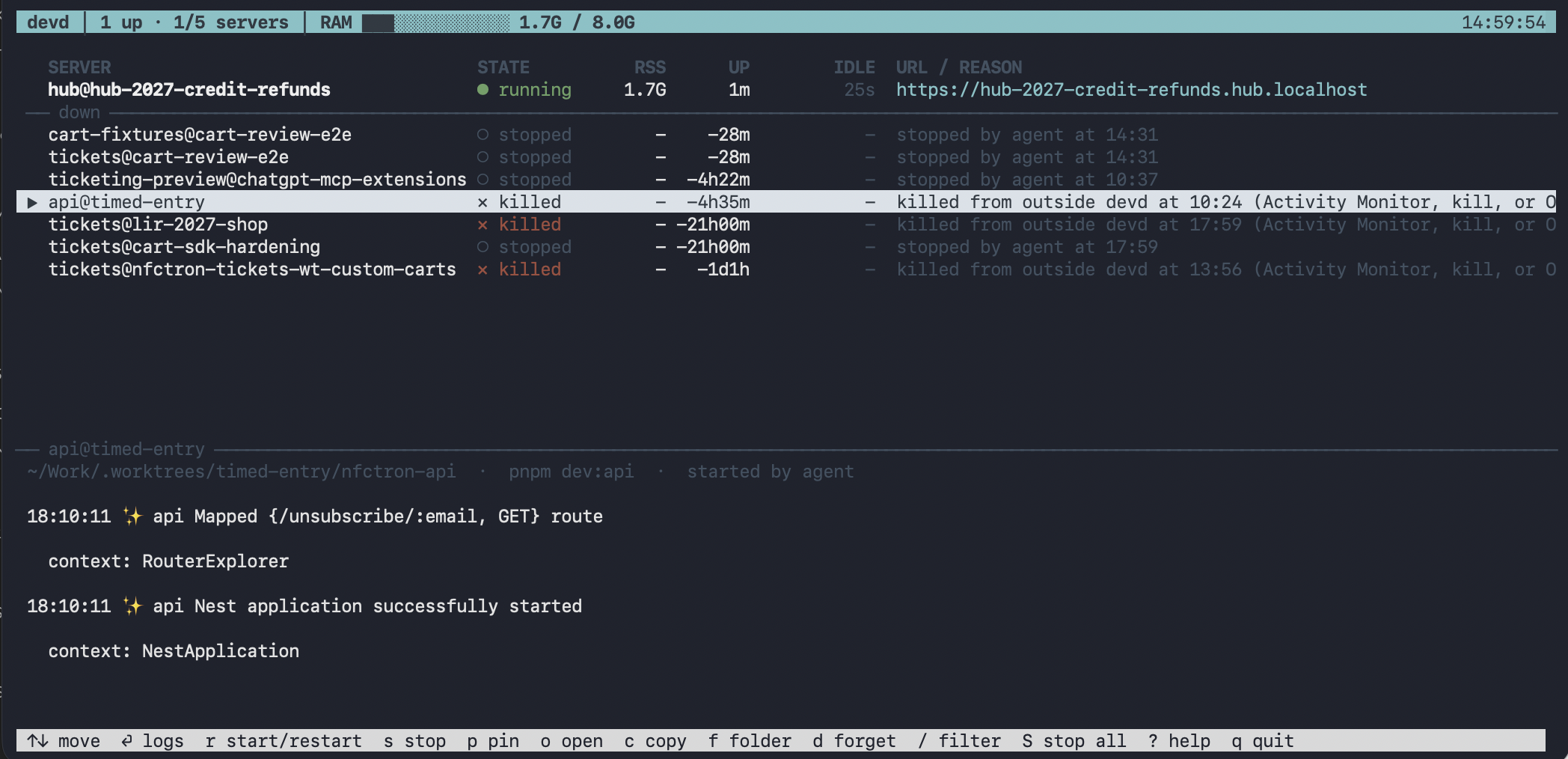
Agents and developers start servers all day. devd gives each app and checkout a stable URL, a visible owner, and a clear reason when it goes down. One command starts or reuses a server; one panel shows the whole workspace.
Why I built it
The server shouldn't be a mystery.
A background shell is easy to start and easy to lose. In an agent-heavy workflow, duplicate servers fight over ports, logs disappear into terminals, and a stopped process may quietly come back. devd turns those loose processes into a small, shared control plane you can actually inspect.
A URL for every checkout
portless gives each app a stable local HTTPS address. Worktrees get their own URL, and repeating devd up reuses the existing server.
Human decisions stick
See live state, logs, and why a process went down. If you stop a server or it is killed outside devd, an agent cannot silently restart it.
No server graveyard
Agent-started servers stop after inactivity. A server count and RAM budget keep a busy coding session from growing without limit.
Everyday use
Start, inspect, move on.
Run devd in any project with a dev script. It manages the process behind portless, prints the URL, and keeps serving after you close the shell. The panel is always one command away.
Make your local setup calmer.
The README walks through prerequisites, agent hooks, your first server, and useful commands. The source is open and easy to inspect.