From four monitors to six
Filip Ditrich
CEO, NFCtron
4 min read
Four external monitors were already a little excessive. I added two more anyway.
The point was not to fill every square centimetre with something moving. I wanted two more places where work could stay open: communication, dashboards, documentation, or whatever I would otherwise keep burying behind the window in front of me.
Getting the MacBook to drive six screens turned out to be the easy part. Arranging them into the cockpit I had in mind is still a work in progress.
Four native, two through DisplayLink
My MacBook Pro has an M3 Max, which supports up to four external displays natively. I was already using all of them with the lid closed:
- three monitors connected to the three USB-C ports;
- one monitor connected through HDMI.
That left no native display output—and no free USB-C port—for monitors five and six.
The practical answer was to leave those four connections alone and add two software-driven displays through DisplayLink. I chose the i-tec USB-A/USB-C Dual 4K/60 Hz HDMI adapter, which can run two independent HDMI monitors from one USB connection.
The adapter solved the display limit. It did not solve where to plug it in.
The useful port hiding in the monitor
One of my USB-C monitors has two ports on the back marked USB SS 5V. They looked like ordinary downstream USB ports, but I needed to know whether the monitor was actually passing their data back to the Mac over its existing USB-C cable.
The quickest test was an SSD. I plugged it into the monitor and it appeared in Finder. That confirmed the monitor was not only receiving video and power over USB-C; it was also acting as a USB hub.
So the final connection became:
- The existing monitor stays connected directly to the MacBook over USB-C.
- The i-tec adapter plugs into that monitor’s USB SuperSpeed port.
- Monitors five and six connect to the i-tec over HDMI.
The other two USB-C monitors and the HDMI monitor stay exactly as they were. No additional dock, no passive splitter, and no need to rebuild a four-monitor setup that was already stable.
After installing DisplayLink Manager and granting the required macOS screen-recording permission, all six appeared as independent desktops.
The mount is harder than the electronics
I did not want a flat 3×2 video wall. The goal was a shallow cockpit: the centre column facing forward and the side columns turned inward, so the outer screens sit at a more natural distance and angle.
I considered a single six-monitor stand and several combinations of tall arms. None felt worth committing to before I knew whether I would actually enjoy working with six screens.
For this first version, I kept the existing centre stack and added two inexpensive AlzaErgo DE35 pylons for the upper side monitors. It was deliberately a prototype rather than a final mounting system.
Six-monitor geometry options
Front view
Top view
Keep each left and right pair at the same inward angle. Bring the two side columns toward the centre, then set the upper row slightly farther back instead of tilting it heavily downward.
- Side angle
- 15–18°
- Top-row setback
- 3–5 cm
- Expected seam
- 2–5 mm
It works. It is not finished.
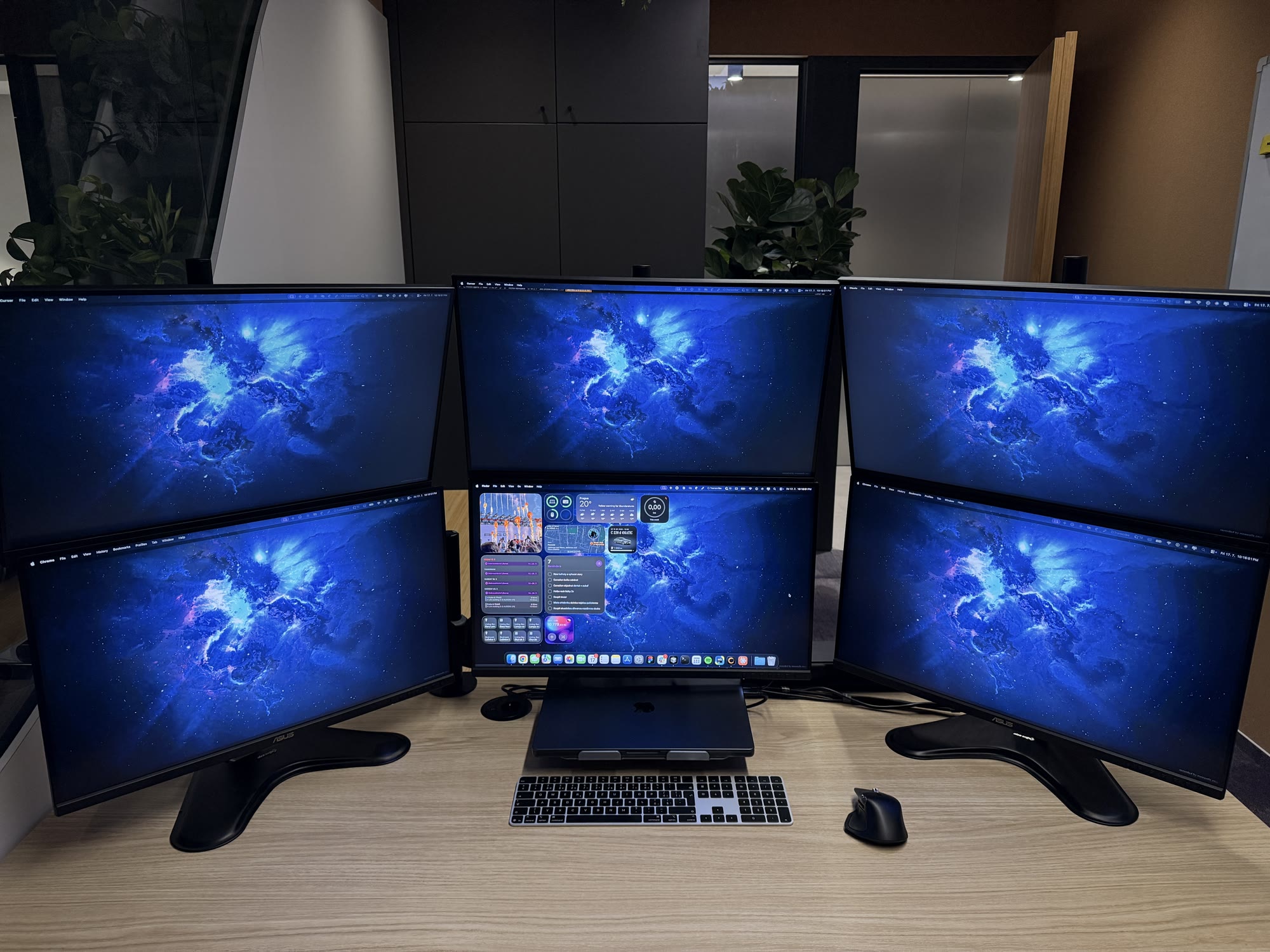
The current result: six working displays, and a monitor geometry that still needs another pass.
Functionally, the upgrade did what I wanted. I now have two additional full-size places for windows that used to compete for space. The DisplayLink screens are perfectly useful for browsers, communication, dashboards, terminals, and other everyday work.
Visually and ergonomically, I am not satisfied yet.
Turning the side columns inward creates the cockpit effect, but it also opens visible V-shaped gaps where they meet the centre column. Flattening everything closes those gaps, but then the setup stops feeling like a cockpit. The upper row could also use more downward tilt, yet tightly stacked monitors start colliding unless the upper screens can move farther back.
The next version needs a mounting system with better independent depth control. Ideally, the upper row will sit slightly behind the lower one while each left and right pair stays aligned as a single curved section. That should make it possible to keep the wraparound shape without the awkward seams.
For now, the experiment is a success: six monitors work from one MacBook, and I gained the two extra windows I wanted. The display problem is solved. The geometry is not.